
Wednesday, 3 August 2016

How to write Queries while connecting to the Excel from Tableau
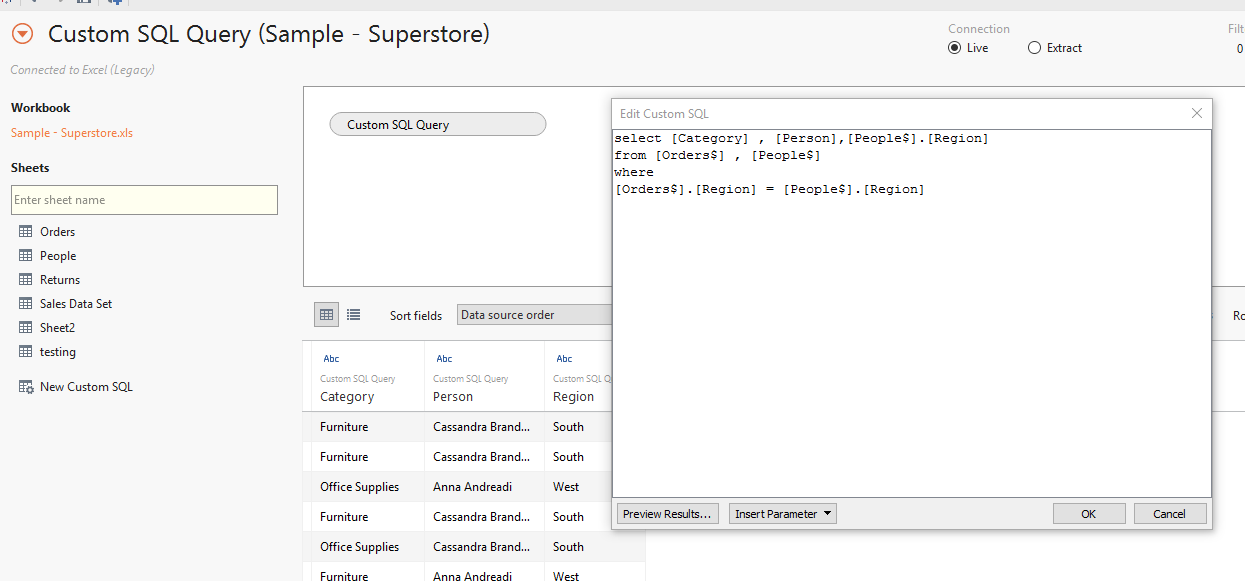
1) While connecting to the Excel Database, select the Excel File then click on "Down side arrow Button" then select the "Open with Legacy Connection".

2) Now Drag the "New Custom SQL" option from left side of screen to the work Area. then It propt us to write the queries.


Saturday, 23 January 2016
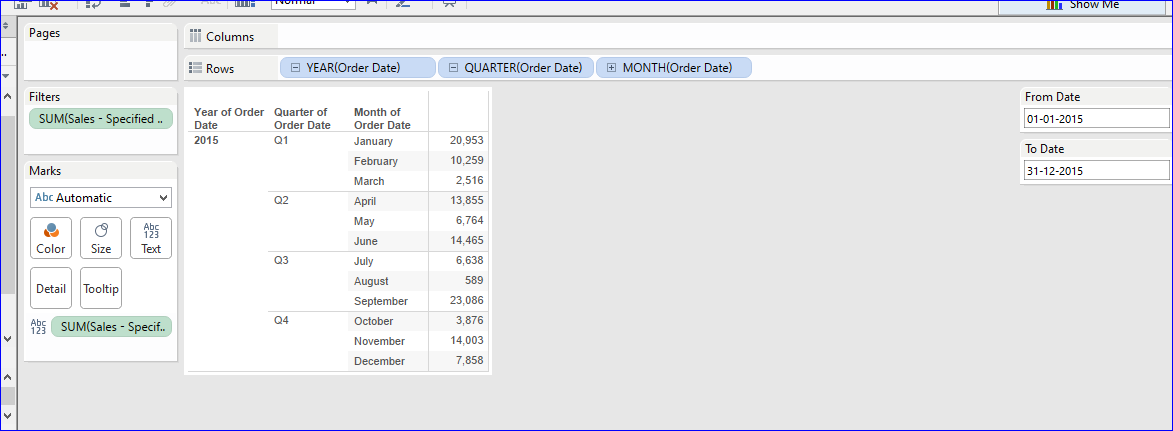
How to show the sales volume for specified period, it means from specified date to specified date.
1) We have to create two Parameters, 1 is for From Date, another is for to Date.

2) Create a calculated field using two Date

Parameters as below image.


2) Create a calculated field using two Date
Parameters as below image.

3) Now right click on two Parameters then select the option "Show Parameter Control".
4) Now we can select the Date Range with the help of From Date Parameter To Parameter.


Now we can handle the non selected dates data - Nulls handling.
Drag the calculated field on to filters shelf then select "Sum" option then select "Special" tab then select "non-null Values".

Now report is showing the data for selected Dates Range.

Thursday, 3 December 2015
Want to analyze the data like Sales Variance Percentages from previous year to current Year.
1) Create a Calculated field to get the "2014 Sales" as the following screen shot.

2) Create a Calculated field to get the "2015 Sales" as the following screen shot.

3) Create a Calculated field to get the "2014 - 2015 Sales Variance" as the following screen shot.

4) Right click on "2014 - 2015 Sales Variance" , then click on "Default Properties", then click on "Number Format".

6) Then select "Percentage" as the Data format.

7) now add all the Calculated fields.

Wednesday, 2 December 2015
Calculating Ranks in Tableau
Create a parameter like below.

create a calculation, drop it on "Text Labels"

Right click on parameter, then click on "Show Parameter Control".
Drag "Measure Selection" field twice onto Columns shelf, State on to rows shelf.

Then Right click on first Measure Selection Column (Rank) then click on "Discrete", Change ir from Column shelf to Row shelf.

Then applying the Sorting

Then Copy the Rank Column into "Filter Shelf". ( I am using laptop so how i am doing here is CTRL+ALT+Right click on Mouse + dragging into Filters shelf.)

Then Apply the Filter on Ranking

If you want to hide the Ranks, right click on rank field, click on "Show Header".

=====
I have added normal report, top 5 City report to the Dashboard to come to know how our calculation will work.
Measure


Tuesday, 1 December 2015
How to Filter the Multiple Values.
As of now Tableau does not have "IN" operator to use in the Calculation but there is an alternative that is "OR"
Case [Region]
when "Central" then "Territory - 1"
when "East" then "Territory - 1"
else "Territory - 2" end
Or
If [Region] = "Central" or [Region] ="East" then "Territory - 1"
else "Territory - 2" end
Wednesday, 18 November 2015
TDE fies - Extracts
Extracts are saved subsets of a data source that you can use to improve performance, upgrade your data to allow for more advanced capabilities, and analyze offline. You can create an extract by defining filters and limits that include the data you want in the extract. After you create an extract you can refresh it with data from the original data source. You can either fully refresh the data, replacing all of the extract contents; or you can increment the extract; which only adds rows that are new since the last refresh.
Extracts can:
- Improve performance. For file based data sources such as Excel or Access, a full extract takes advantage of the Tableau data engine. For large data sources, a filtered extract can limit the load on the server when you only need a subset of data.
- Add functionality to file based data sources, such as the ability to compute Count Distinct.
- It provides work offline facility to the developers.
- Extracts are saved with .tde extension.
Limitations:
Subscribe to:
Posts (Atom)